
Nintendo Switch Parental Cont…
Nintendo Co., Ltd.Lifestyle
4.78.73K Reviews
- Version
- 2.4.0
- Installs
- 10.00M
- Age Rating
- Everyone
Screenshots
Our Review of Nintendo Switch Parental Cont…
 Analysis by Appyee
I spent time with Nintendo Switch Parental Controls as a practical companion for families using a Nintendo Switch, and my impression is that its value comes from making supervision more deliberate rather than trying to replace a conversation with a child. It is a free lifestyle app from Nintendo Co., Ltd., designed around the simple idea of helping an adult understand and guide play. That focus makes it easier to judge than a broad family-safety suite: you are looking at a tool connected to one gaming system, not an all-purpose phone monitor.
The app has a 4.7 average from around 158 thousand ratings and more than 10 million installs, which gives it a strong public track record. I would not treat popularity as proof that every family will find it comfortable, though. The important questions are more personal: do you want a Nintendo-specific control panel, are you willing to configure it carefully, and will the rules make sense to everyone in the household? Those answers matter more than the headline rating.
What the app is really for in everyday family life
The most useful way to think about this app is as a routine-setting tool. Instead of waiting until a child has played longer than expected or encountered something unsuitable, a parent can use the app to establish boundaries before the console becomes part of the evening’s negotiations. That is a small change in timing, but it can remove a surprising amount of friction.
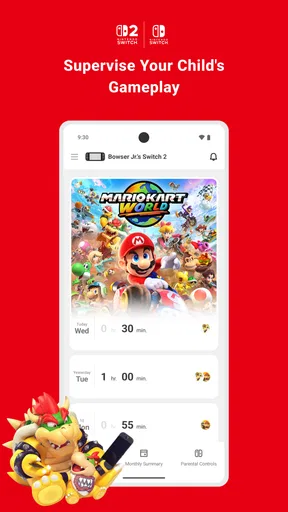
A realistic example is a school night when a child wants to start playing after dinner. I would use the app to check the agreed play limit, see whether the session is running longer than planned, and decide whether a reminder is enough or whether the console needs to be paused. The benefit is not only technical control. The child can be told the rule in advance, so the adult is enforcing a visible household agreement rather than inventing a stopping point in the middle of a game.
That works particularly well for families where the Switch is shared by siblings. Different children may have different expectations, but a single console can make those differences awkward to manage. The app gives the supervising adult a central place to review the situation instead of relying entirely on memory, verbal reminders, or a handwritten schedule near the television.
It is also useful for parents who do not want to stand beside the console during every session. Supervision becomes less intrusive when the adult can establish boundaries and check the overall pattern later. I still would not describe this as hands-off parenting. The app can support a family rule, but it cannot explain why a limit exists, settle an argument about “just one more round,” or understand whether a child is upset because a game ended at a bad moment.
Nintendo lists it for Everyone, and that feels appropriate for the supervising side of the experience. The person using the app is likely an adult or older family member, while the actual subject of the rules may be a younger player. The distinction matters: an age rating does not mean the app itself can make every game or online interaction appropriate. It simply describes the app’s intended general audience.
The controls are most valuable when you set them before there is a problem
My strongest practical advice is to configure the app during a calm moment, not while a child is already playing. Start by agreeing on ordinary household details: when play is allowed, what happens when time expires, and which adult is responsible for changing a rule. This prevents the app from becoming a mysterious authority that suddenly interrupts the console without explanation.
A second useful habit is to review the settings after a few days rather than assuming the first arrangement is perfect. A limit that works on a school night may be too restrictive on a weekend, while a rule that seems generous at first may be difficult to maintain when homework, meals, or bedtime are involved. The app is more effective when it reflects the family’s real schedule instead of an idealized one.
I also found that the app’s greatest strength is its narrow scope. Because it is made specifically for Nintendo Switch supervision, it avoids the clutter of services that try to manage phones, tablets, computers, social networks, and web browsing all at once. If the problem you are solving is “How do we manage this Switch?”, that focus is reassuring. If the problem is “How do we understand all of our child’s digital activity?”, this will be only one small part of the answer.
Trust depends on what you can see and control
For a parental-control tool, trust is not just about the developer’s name. It is also about whether the adult can understand what a setting does before turning it on. I prefer controls that are easy to explain to another parent in the home, because unclear rules often lead to inconsistent enforcement. With this app, I would take time to look through each available option and confirm that the result matches what the household actually intends.
The connection to Nintendo is a meaningful part of that trust context. The developer is not an unfamiliar third party offering a generic overlay for a console. At the same time, that should not encourage anyone to skip ordinary privacy care. I would still use a strong account password, avoid sharing account details casually, and check the app and account screens myself rather than handing the phone to a child and assuming the configuration is protected.
One of the less obvious trade-offs is that convenience and authority are closely linked here. The easier it is for an adult to change a rule, the more important it becomes to decide who should have that ability. In a household with two caregivers, agree on whether both adults can adjust settings or whether one person handles changes. Without that agreement, a child may receive conflicting messages even though the app itself is functioning correctly.
I would also avoid treating a control screen as a complete record of a child’s wellbeing. A visible play pattern can tell you something about routine, but it cannot tell you whether the game was calming, frustrating, social, educational, or simply used to avoid another task. The app is best used as a prompt for a conversation, not as a substitute for one.
Where data sensitivity enters the experience
Any app that helps an adult supervise a child deserves a more careful look than a casual utility. Before using it, I would read the current privacy information presented during setup and in the relevant account or device screens. I would pay attention to what information is requested, why it is needed, and which choices are shown clearly. I would not assume that a familiar brand removes the need for that check.
The most sensitive moments are usually not the first launch but the moments when accounts are connected, devices are registered, or another family member is given access. Those steps can affect who sees supervision information and who can alter the rules. I recommend completing setup yourself, checking the account identity on the screen, and avoiding shared phone access unless every adult involved understands what it permits.
There is also a privacy balance inside the family. A child may reasonably want to know what is being monitored and when an adult can intervene. Explaining the arrangement openly is healthier than presenting the app as invisible surveillance. I would tell the child what the limits are, what information is being used to manage play, and how to ask for a change. That approach does not weaken parental authority; it makes the boundary understandable.
Another practical point is device security. If your phone is unlocked and regularly used by several people, the app’s controls may be easier to reach than you expect. I would use the phone’s own screen lock and be cautious about leaving the supervision app open. This is not a Nintendo-specific trick; it is simply good account hygiene whenever a mobile app can influence another device in the home.
Families should also decide what to do when the supervising adult changes phones, accounts, or household responsibilities. Write down the agreed process in a secure place, not in a public note beside the console. A little preparation can prevent the frustrating situation where nobody is sure who can manage the settings or how the original arrangement was created.
User choice matters more than maximum restriction
I do not think the strictest possible configuration is automatically the best one. A rule that is impossible to follow will be ignored, challenged, or repeatedly overridden. I would begin with the smallest set of controls that solves the actual problem, then add more structure only if the family needs it. The goal is predictable play, not a contest between the app and the child.
This is where the app compares favorably with informal alternatives such as kitchen timers or verbal instructions. A timer can be easy to understand, but it depends on someone remembering to start it and act when it rings. A spoken rule is flexible, but flexibility can become inconsistency. Nintendo’s dedicated approach is stronger when you need a repeatable routine tied to the Switch itself.
On the other hand, a general parental-control service may be better for a household that wants one place to supervise several platforms. If a child spends as much time on a phone, tablet, computer, or another console as on the Switch, using separate tools can create gaps and extra administrative work. I would choose this app for Nintendo-focused supervision, not because it can replace every other family-safety option.
There is a social trade-off too. Some children respond well to clear limits because they know exactly what to expect. Others become more focused on the countdown than on the activity, especially when they are deeply involved in a game. In that situation, I would combine the technical rule with a transition warning and a consistent stopping ritual. The app can enforce the boundary, but the family still has to make the ending manageable.
For older children, I would gradually involve them in reviewing the rules. Ask whether the schedule fits homework and sleep, and explain what would justify a change. This gives the child a path to earn more independence without removing the adult’s responsibility. It also reveals whether a setting is solving a real problem or merely expressing anxiety.
Version, access, and the small details worth checking
The app was released on March 1, 2017, and its current version is 2.4.0. It requires Android 8.0 or later, so I would check the phone’s operating-system version before planning a setup session. That is a simple step, but it avoids discovering a compatibility issue when the family is already trying to establish a rule.
It is free to download, which lowers the barrier for families who want to test a Nintendo-specific approach without adding another subscription decision. Free access does not remove the need to consider account security or privacy choices, but it does make experimentation easier. I would try it for a normal week rather than judging it after the first launch, because the real value appears during repeated routines.
When troubleshooting, I would work methodically: confirm that the correct Nintendo account is being used, check that the intended console is the one connected, and review the visible settings before changing several things at once. Making multiple changes together makes it harder to tell which adjustment solved a problem. If another adult manages the household account, involve that person early instead of creating a second arrangement that may conflict with the first.
I would also keep expectations realistic about what an app can do during unusual situations. Travel, holidays, illness, shared consoles, and visiting relatives can all make a normal schedule awkward. Decide in advance who may approve an exception and how it will be communicated. A clear exception process is better than secretly disabling controls and forgetting to restore them.
Who should use it, and who should look elsewhere
I would recommend Nintendo Switch Parental Controls to a parent whose main concern is managing play on a Nintendo Switch and creating consistent household expectations. It is especially suitable when the console is shared, when verbal reminders are not working, or when an adult wants a clearer routine without installing a broad monitoring suite across every device.
I would be more hesitant for a family seeking detailed supervision across an entire digital life. This app’s Nintendo focus is its advantage and its limitation. It will not become a universal answer simply because it is made by the console’s developer. If the main concern involves phones, web browsing, messaging, or several gaming platforms, a broader solution may be more practical, even if it is less focused.
I would also skip it if the household is unwilling to discuss rules openly. Technical restrictions can create short-term control while damaging trust if a child does not understand what is happening. In that case, start with a family agreement and use the app only when everyone knows the basic expectations. The tool works best as part of a parenting approach, not as the entire approach.
My final view is cautious but positive. This is a focused, free lifestyle app that can turn Nintendo Switch supervision from repeated arguments into a more predictable routine. Its public reception is strong, and the connection to Nintendo makes the purpose clear. Still, I would judge it by the quality of the family’s setup: secure account access, transparent rules, sensible exceptions, and regular conversations about changing needs.
The best reason to use it is not maximum control; it is clearer control that everyone can understand. If that is what your household needs, I think it is worth trying. Configure it slowly, explain the boundaries, review the arrangement after real use, and remember that no control panel can replace attention, judgment, or trust.
Verdict
Strengths of Nintendo Switch Parental Cont…
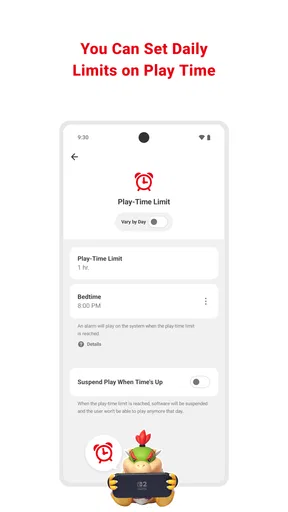
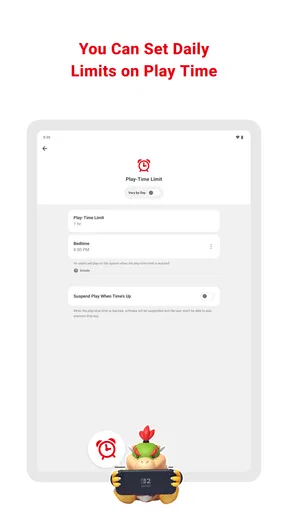
- Helps limit daily playtime with flexible schedules.
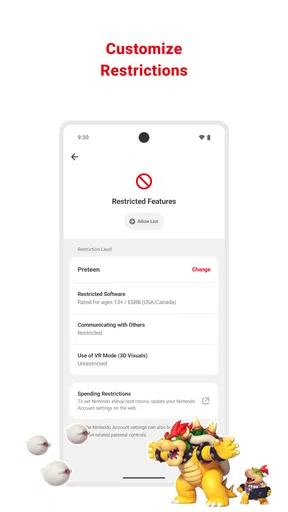
- Supports age-based game restrictions and content filters.
- Can pause the console remotely from a smartphone.
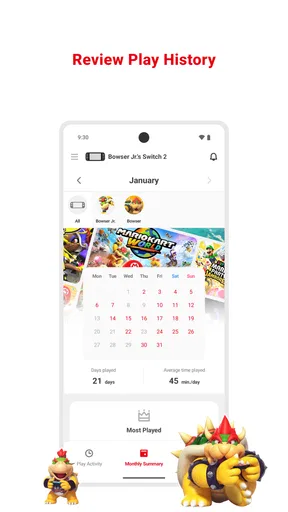
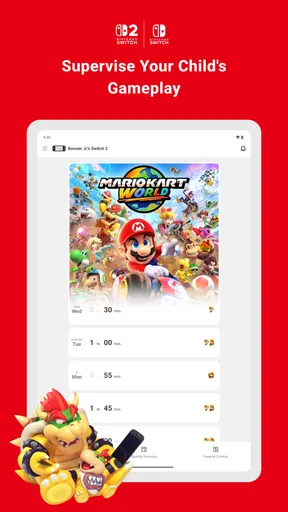
- Provides monthly activity reports for parents.
- Works with Nintendo Switch and Switch Lite consoles.
Limitations of Nintendo Switch Parental Cont…
- Requires a Nintendo Account and internet connection for setup.
- Some restrictions may be bypassed by changing console settings.
- Reports may not update instantly after gaming sessions.
- Limited usefulness for families with multiple Nintendo Accounts.
- Remote controls depend on the console being connected online.
Other Releases by Nintendo Co., Ltd.
View All
Super Mario Run
Action3.9

Mario Kart Tour
Action4.3

Nintendo Switch App
Entertainment3.9

Fire Emblem Heroes
Simulation4.5
Similar Picks in This Category
View All
SmartThings
Samsung Electronics Co., Ltd.4.6

Google Home
Google LLC4.0

Pinterest4.2

Astrotalk - Talk to Astrologer
Astrology & Horoscope4.7

My Verizon
Verizon Consumer Group4.5

Samsung Wallet (Samsung Pay)
Samsung Electronics Co., Ltd.4.1
Frequently Asked Questions
What is Nintendo Switch Parental Controls, and what does it do?
Nintendo Switch Parental Controls is the official companion app for managing a Nintendo Switch console from an Android or iOS device. After linking it to the console, parents can set daily play-time limits, choose age-based game restrictions, control communication features, and review activity reports. It is designed to make supervision easier without requiring constant access to the console itself.
Does the app work with every Nintendo Switch model?
The app is intended for Nintendo Switch consoles, including the standard Nintendo Switch, Nintendo Switch Lite, and Nintendo Switch OLED Model. However, the console must have a compatible system version and an internet connection for the app to communicate with it. Some settings may behave differently depending on the console, game, region, or software version, so keeping both the app and console updated is recommended.
Can I set different play-time limits for different children?
Yes, the app supports managing a child’s Nintendo Switch activity through a supervised account or profile setup. Parents can configure daily play-time limits and bedtime restrictions, while the console can display warnings as the allowed time approaches. Families with multiple children should carefully link the correct Nintendo Account or user profile, because settings and activity reports depend on how the profiles are configured.
Can the app block games, purchases, or online communication?
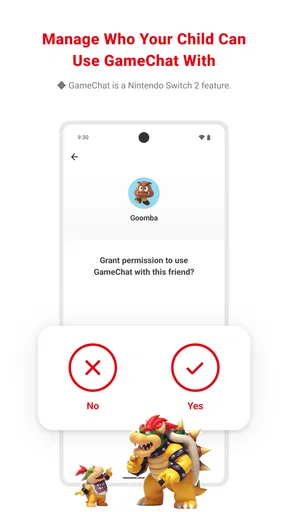
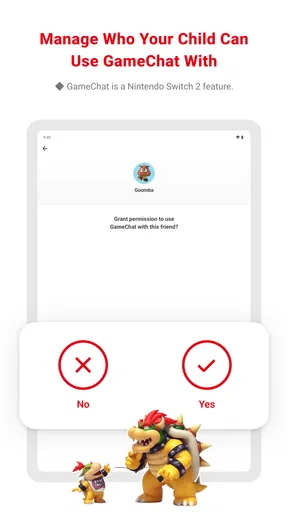
Nintendo Switch Parental Controls can restrict games according to age ratings and can limit certain communication or social features, depending on the title. It also helps parents manage whether children can use specific console functions. However, it is not a complete replacement for Nintendo Account, eShop, or device security settings. Parents should review those services separately and protect account passwords and payment information.
Does Nintendo Switch Parental Controls require a subscription or constant internet access?
The app itself is generally available without a separate paid subscription, but it requires a compatible smartphone, a Nintendo Account, and a linked Nintendo Switch console. Internet access is needed during setup and whenever the phone must synchronize settings or retrieve activity information. If the phone or console is offline, newly changed restrictions and reports may not update immediately.
